Updating Flash


You can also check to make sure you're on the latest version of Firefox. 

Here's where you can check Flash

IMPORTANT fix for 'My First Day at School'


Someone recently brought to our attention that the name of the product title below was wrong. 

My First Day of school 

should've be... 

My First Day at school

When we fixed the error it caused the eBook for this book to stop working with the incorrect spelling. 

This is prime "Back to School" marketing, so please take a second to fix the typo so the eBook works. 


How to ADD LINKS: clicking image or words to open new webpage


To create a hyperlink, linking a word or image to open a new web page, you'll first need to copy the destination URL. Open the webpage you want to link to in your browser and copy the URL (web address). 

Now go to your website admin and open the page, product or category with the item you want to link. In the text section, highlight the word or image that will link to the new web page. Then you can either right click and select insert/edit link, or click the chain icon below the "underline" icon. 

A new window will appear and you'll paste the destination URL into the "Link URL" field. 

Then click "insert" and the window will close, and you can click the green Save button.

Savi Newsletter - Jan 11th, 2012

Marketing tips and new features to kick start the New Year 

Time to take down the lights ...
Now that Christmas is over, don't forget to spend a few minutes updating your home page, template, banners and other Holiday marketing.


... And make room for Valentines Day!
In your IMAGES section you should have a folder for Valentine's Day banners
Valentines Home Page ideas
Valentines Category ideas


NEW: easily designate a new Home Page
We've made it easier to setup your Valentines home page while saving your Holiday home page
Read More


NEW: Interactive Books coming soon!
One of the first big new releases for 2012 will be our new Interactive Books. We're still in working on the prototype but our goal is to release them in the first quarter of this year. We'd love your feedback
Read More


Do you need the Teddy Bear with Personalized Book illustrations?
If we gave you a new refreshed website on the Savi2 platform, we forgot to add the graphics of the Teddy Bear holding the book showing personalized fields. You can download them from this link and add them to your website.
Get the new Teddy Bear illustrations


Here's to a happy and prosperous New Year!

SaviSites team

NEW Interactive Books coming soon!

One of the first big new releases for 2012 will be our new Interactive Books. We're still in working on the prototype but our goal is to release them in the first quarter of this year. 

We are making these a high priority because of the sales potential we believe they will bring your online business. Let your customers become your best sales people by giving them something fun and interactive to share with their friends. 

New features we're trying to include:
- The book will load with sample data, but customer can update fields and preview their own story
- Menu link to view all interactive stories available and switch titles
- Adding a "Buy Now" button on the window
- Adding "Share" features so customer can share their demo socially
- Link to "Create Your Own" if book is opened from a shared link
- Compatibility on all mobile and tablet devices
- Links back to your website so when people share their marketing your business
- Countdown for how long a shared demo will remain active
- If shared book expires, the link will load with sample text and prompt "customize this story"
- Adding "share an online version with friends" link for each product ordered on Thank You page
- Adding "share an online version with friends" link for each product ordered in confirmation email

We will be extensively measuring the traffic and testing different ideas to find which produce the best results. Below are some of the current ideas we plan to test.
- Whether to show full stories or partial stories
- How long to keep a shared demo active (to encourage ordering physical copy)
- Which text and buttons get the highest clicks
- What layouts get the highest "Buy Now" conversions

Stay tuned!!!

How to make a page HOME PAGE

With SaviSites you can easily make any of your pages the Home Page, which allows you to create and save multiple home pages - each with it's own banners, text descriptions, category previews and featured products column.

This means you can swap from one seasonal home page to the next in seconds. It also makes switching between different test layouts a snap.

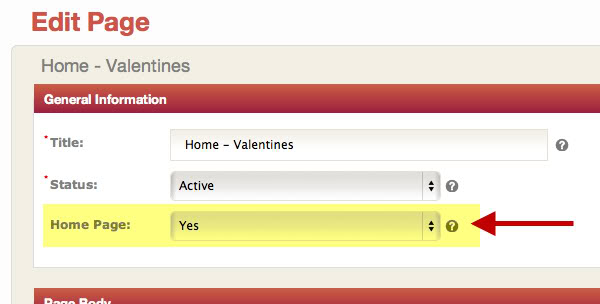
How to designate a Home Page:
1. Go to Pages table (the checkmark shows the current home page)
2. Open the new page you want to designate
3. Change Home Page to YES
4. SAVE the page


Create-A-Book Teddy Bear Banners

Here are the 4 banners with the Create-A-Book teddy bear holding a book